 TR
TR EN
EN DE
DE FR
FR AR
AR PL
PLShowing 1–16 of 93 results
Products
- IC_19
Agriculture Map of Turkey
IC_19Thanks to the diversity of climates in Turkey, there are many different agricultural products. Visitors place the provinces on the map of Turkey on the touch screen. The agricultural product of each correctly placed province is reflected on the map of Turkey on the screen.
IC_19 - H_09
Aircraft Control
H_09The visitor will touch and move the control points of the airplane in the open part of the device and in this way he/she will be able to see the change in the movements of the airplane in the lantern. Thus, they will witness the effect of the control points not only on the surface they touch but also on the airplane.
H_09 - TIP_01
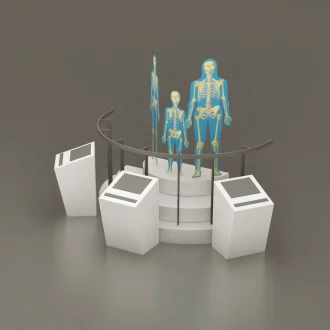
Anatomical Family
TIP_01Visitors see images of human anatomy projected onto human shapes representing a man, woman and child. Short introductory image sets follow a sequence of engaging visual images through each organ system.
TIP_01 - T_11
Artificial Intelligence and Image Processing
T_11After the visitor selects the dystopian background image on the touch screen, a counter appears on the screen. The visitor strikes a pose, and at the end of the timer, the photo is taken. After the photo is displayed, the visitor can send the photo to themselves by entering their e-mail address.
T_11 - U_01
Astronaut Memorial Corner
U_01The person who enters the astronaut model on the lunar surface is photographed with the image of space from the Moon
in the background. The lunar surface
is made of walkable material and similar to the realU_01 - O_07
Automotive from Past to Present (let’s put it in the center)
O_07The visitor rotates the rotating disk on a round cutout panel. With the rotation of the user, the rotating disk reflects the development of automotive history from the past to the present on the screen. Thus, the visitor has the opportunity to examine the automotive history and observe its development.
O_07 - O_14
Automotive Technologies
O_14Visitors will have an idea about autonomous cars that will be integrated into our lives in the future, environmentally friendly cars that run on electricity
, etc. and will compare today’s technology with
the automobile technologies of the future.O_14 - O_15
Autonomous Car
O_15Visitors will experience how a
vehicle moves without human control, while reinforcing their knowledge of autonomous vehicles
. How the environment is perceived from both the passenger’s eyes and the vehicle computer’s eyes
will be projected on the screen in a user-selectable way. In this way, visitors will be able to grasp the working mechanisms of the sensors used in autonomous vehicles
.O_15 - T_04
Biodegradable Materials
T_04To find out how long it takes for representative pieces of waste to decompose in nature, visitors place them in the appropriate slot in the unit setup. By filling all the slots and pressing the check button, they can learn which type of waste decomposes and how long it takes by following the visual stimuli.
T_04 - TD_02
Biodiversity Conservation
TD_02Through interactive games and multimedia, visitors will learn about the conditions that are effective in the formation of biodiversity, the damages caused by GMO products to nature, and the duties and responsibilities of people to protect the balance of nature.
TD_02 - T_02
Biomimicry
T_02Visitors select a photo representing a material sample from the table’s containers. They match the photo with the images on the table and place it in the RFID reader area next to the appropriate one. If the match is correct, a light turns on and they can read the description.
T_02 - TIP_03
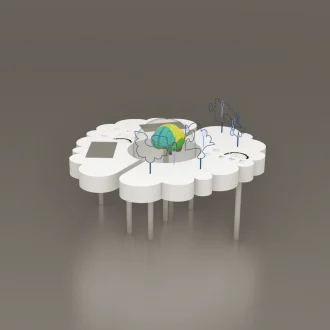
Brain
TIP_03The visitor learns the part and structure of the brain thanks to the brain model in the middle of the table.He can compete with his friend and also with himself by playing a math game on the touch screen in the left lobe.In the right lobe table, he tries to pass the tool in his hand without touching the wire.If he is better at the game in the left lobe, he has mathematical abilities.If he is better at the game in the right lobe, he has more information, shape and imagination.
TIP_03 - DM_11
Bridge Building
DM_11Visitors, alone or with other visitors, build a bridge by connecting the pieces. They can walk across the bridge.
DM_11 - U_10
Build and Launch your Rocket!
U_10The visitor designs his/her model by following the instructions on the rocket building table. Then they place their rocket in the acrylic chamber in the rocket launch unit and launch it. They follow the countdown on the touch screen on the launch unit.
U_10 - R_04
Build Your Own Robot
R_04It is an educational and fun set where you can build your own robot by combining parts. Suitable for robotics workshops and STEM Curriculum. There are two types as simple and advanced.
R_04 - E_18
Clean Energy House
E_18The clean energy house setup is a game-based setup. A house model has two screens on opposite sides of the model, one displaying the garden and the other the living room. The screens are turned off and
is activated via the buttons in front of them.E_18